Directors: Overview
Directors are the core data processing engines within the DataStream platform, responsible for collecting, processing, transforming, and routing security telemetry data from various sources to target destinations. They serve as the central orchestration layer that maintains data sovereignty by keeping sensitive information within your environment while providing centralized cloud-based management.
Provider → Device → Preprocessing → Pipeline → Postprocessing → Target → Consumer
Director (executes the entire processing flow as a service)
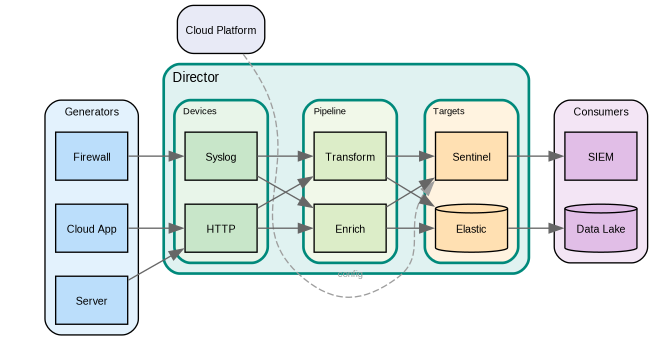
What is a Director?
A Director is a lightweight, containerized service that acts as a secure data processing hub in your infrastructure. It connects securely to the DataStream cloud platform for configuration management while ensuring all sensitive security data remains within your controlled environment.
Key Capabilities
A Director provides comprehensive data processing capabilities, ingesting security data from multiple sources including syslog, APIs, files, and databases. It applies real-time transformation and normalization using YAML-defined pipelines, supports multiple security schemas (ASIM, OCSF, ECS, CIM, UDM), and routes processed data to various destinations such as SIEM platforms, data lakes, and security tools.
From a security and compliance perspective, Directors maintain data sovereignty by processing all data locally. They establish outbound-only HTTPS connections to cloud management services, provide comprehensive audit logging and activity tracking, and support enterprise security requirements and compliance frameworks.
Directors are designed for scalability and reliability, offering horizontal scaling through clustering capabilities and high availability configurations for mission-critical environments. They provide resource-efficient processing with minimal infrastructure requirements and support automatic failover and load balancing in clustered deployments.
Platform Management Options
DataStream provides four distinct management approaches for Directors, each designed for different organizational needs and security requirements:
Self-managed Directors
Self-managed Directors provide complete control over the deployment and management of your data processing infrastructure. This option is ideal for organizations with specific security requirements or existing infrastructure management processes.
Self-managed Directors give you full control over your deployment environment and configuration. You handle updates, patches, and maintenance directly, and can implement custom security controls and compliance configurations. This approach integrates with existing infrastructure monitoring and management tools, and supports air-gapped or restricted network environments.
A self-managed Director downloads the Agent binaries it serves from dl.vget.me. In an air-gapped or restricted network, copy them to it by hand. See Agent Binaries Without Download Access.
Suitable For:
- Organizations with strict data governance requirements
- Environments with existing container orchestration systems
- Companies requiring custom security configurations
- Regulated industries with specific compliance needs
Managed Directors (Enterprise Feature)
Managed Directors offer a fully-managed service where VirtualMetric handles the infrastructure management, monitoring, and maintenance of your Directors while still maintaining data sovereignty.
With Managed Directors, VirtualMetric handles automated deployment and configuration management, along with proactive monitoring and maintenance. You receive automatic updates and security patches, 24/7 support and incident response, and performance optimization with capacity planning.
Managed Directors are available as part of the Enterprise subscription.
Suitable For:
- Organizations seeking reduced operational overhead
- Teams without dedicated infrastructure management resources
- Companies prioritizing time-to-value over operational control
- Environments requiring guaranteed SLA and support coverage
Orchestrated Directors
Orchestrated Directors are designed for auto-scaling cloud environments where instances are automatically managed, scaled, and replaced by the platform. The platform handles instance lifecycle, scaling decisions, and replacement of unhealthy instances, while you retain control over Director configuration and updates.
Orchestrated Directors behave like Self-managed Directors for configuration purposes. Updates are downloaded and applied manually, unless the machines can take an update one at a time. Then the organization's update settings and the Director's own rule apply, as they do for a Managed Director (see Update Management Tab in Management). Connection checks are the exception: an Orchestrated Director runs them as a Managed Director does, so an Agent's connection and an agentless device's access are checked from the console. Only a Self-managed Director skips them.
Orchestrated Directors are always standalone installations and cannot be added to clusters. The cluster creation interface excludes Directors set to orchestrated mode.
An Orchestrated Director's machines can still form a cluster of their own for the Director's built-in queue. That cluster keeps copies of each machine's records on the other machines, and the
When every machine is replaced. When every machine of an Orchestrated Director that runs such a cluster is replaced, for example after an outage, the new machines wait for the earlier machines. Only the earlier machines held the records of the built-in queue. While they wait, the new machines form no cluster. The wait ends in one of these ways:
- An earlier machine comes back and hands its records over. The cluster then forms again by itself.
- The waiting time runs out, and the machines start a new cluster by themselves. This happens only with the Director's default recovery setting,
Save a copy of the data and start clean . The waiting time is 10 minutes, unless the Director'srecovery.last_resort_aftersetting gives another. Without a copy of the queue in shared state storage, at least 3 machines must wait. - A person starts a new cluster with
Start a new cluster on theCluster card of the Director'sHealth tab. See Health Tab in Management. - When fewer than 3 machines wait and they can't form a cluster, a person can let them go on without one, with
Go on without a cluster on the same card. Each machine then keeps its records only on its own disk.
When the Director's recovery setting is
When creating devices, the device creation wizard offers an Orchestrated Director like any other, marked with an Orchestrated tag. Every device type can be assigned to it, and Windows and Linux devices can use Agent or Agentless deployment.
Suitable For:
- Auto-scaling cloud deployments with dynamic instance management
- Ephemeral or containerized environments with platform-managed lifecycle
- Infrastructure where instances are automatically replaced or rotated
Serverless Directors
Serverless Directors run on demand as containers, without dedicated infrastructure to provision or maintain. Instead of installing the Director on a host you manage, you select a container platform and deploy the manifest the platform generates for you.
Every Serverless Director is bound to one of four container types — Docker, Kubernetes, Azure Container Instances, or Azure Container Apps — chosen during creation. The choice determines the form of the deployment manifest produced in the installation step: a Compose service definition, a set of Kubernetes resources, or an Azure Resource Manager template. See Deployment for the container type selection and the manifest.
Serverless Directors receive their configuration from the DataStream platform automatically, as Managed Directors do. Updates, however, behave as they do for Self-managed Directors: they are applied manually rather than through organization-level or director-specific auto-update rules, and the actions menu offers
Serverless Directors are always standalone installations and cannot be added to clusters. The cluster creation interface excludes Directors set to serverless mode.
The deployment mode of a Serverless Director cannot be changed after it is created, and no other Director can be converted to serverless mode. Deploying under a different mode requires creating a new Director.
Suitable For:
- Workloads with intermittent or bursty telemetry volumes
- Container platforms where no persistent host is available to install a Director on
- Azure environments standardizing on Container Instances or Container Apps
Installation Types
Directors support different installation architectures to accommodate various operational requirements and scale needs:
Standalone Installation
Standalone is the default installation type, designed for straightforward deployments where a single Director instance handles all data processing needs. This configuration offers simplified management, resource-efficient operation, and quick deployment and setup.
Standalone installations do not include built-in high availability or load balancing. A single Director instance represents a single point of failure, with limited horizontal scaling capabilities. Backup and disaster recovery procedures must be managed manually.
Recommended For:
- Small to medium-scale deployments
- Development and testing environments
- Organizations with basic availability requirements
- Initial proof-of-concept implementations
Clustered Installation (Enterprise Feature)
Clusters provide high availability by grouping multiple Directors together for automatic failover. When one Director in a cluster fails, the remaining Directors take over its workload, ensuring continuous telemetry processing. Agents and Devices connect to the cluster as a whole rather than to individual Directors, so operations continue uninterrupted as long as at least one Director remains healthy.
To create a cluster, you first deploy Directors as standalone instances, then group them through the Clusters tab in the Directors management interface. A cluster requires a minimum of 3 Directors, and the count must be an odd number (3, 5, 7...) to maintain quorum and prevent split-brain scenarios. Routes configured for a cluster are automatically replicated across all member Directors.
Clustered installations are available as part of the Enterprise subscription.
Recommended For:
- Mission-critical security data processing
- High-volume environments requiring guaranteed availability
- Organizations with strict SLA requirements
- Production deployments requiring enterprise-grade reliability
A Director Without a License
A Director with neither a valid license nor the platform's configuration stops itself 15 minutes after it starts, and exits with code 78, which means its configuration lacks something it needs. Earlier versions exited with code 0.
Before it stops, it logs one Error line, which is also a container's termination message:
The director stopped because it has no valid license and no platform configuration. A director with neither stops 15 minutes after it starts. To keep it running, add a valid license to <license folder>, or connect the director to the platform, and then start it again.
The stop is a normal one: the Director passes on and writes what it holds, as it does for a SIGTERM. What happens next depends on where it runs. The service rows describe the service as the Director installs it, and the Kubernetes row a restart policy of Always, which the Director's own manifests set:
| Where the Director runs | What happens after code 78 |
|---|---|
Linux service (systemd, Restart=always) | Starts again after 2 minutes. systemctl status shows the stop as failed with status 78 |
| Windows service, with its recovery actions | Starts again after 15 seconds, then 60 seconds, then 2 minutes |
Docker, always or unless-stopped | Starts again at once |
Docker, on-failure | Starts again at once. With code 0 it stayed stopped |
| Docker, no restart policy | Stays stopped. docker ps -a shows code 78 |
Kubernetes (restart policy Always), Azure Container Apps | Starts again after about 10 seconds. The pod shows Error, exit code 78 and the line above |
Each run lasts 15 minutes, so the Director never restarts in a tight loop. To keep it running, add a valid license to its license folder, or connect it to the platform, and then start it again.
Director Architecture and Data Flow
Directors operate as secure intermediaries between your security data sources and target destinations, implementing a data sovereignty model that keeps sensitive information within your controlled environment.
Data Processing Architecture
The Input Layer handles multiple simultaneous data source connections through protocol-agnostic ingestion supporting Syslog, REST APIs, and file monitoring. It provides both real-time streaming and batch processing capabilities, with built-in buffering and queuing for reliability.
The Processing Layer executes YAML-defined transformation pipelines that perform multi-schema normalization and enrichment. This layer applies real-time data validation and quality checks, and enables custom logic implementation through processors.
The Output Layer manages multi-destination routing and delivery, adapting formats for different target systems. It handles delivery confirmation and retry mechanisms, with performance optimization tailored for various endpoint types.
Security and Connectivity Model
Directors use an outbound-only communication model where they initiate all cloud platform connections. This design eliminates the need for inbound firewall rules. All cloud interactions use encrypted HTTPS communication with certificate-based authentication and authorization.
The architecture maintains strict data sovereignty: all security data processing occurs locally, and no sensitive data is transmitted to cloud services. Cloud synchronization is limited to configuration and metadata only. A complete audit trail supports compliance and governance requirements.
Agent Pre-Processing Architecture
VirtualMetric Agents support optional pipeline-based pre-processing before sending data to Directors. This distributed processing model reduces Director workload and enables edge-based data transformation.
Processing Models
In the Traditional Model, the Agent collects logs locally at the endpoint and sends raw data to the Director. The Director then processes data through pipelines and forwards the processed data to targets.
In the Pre-Processing Model, the Agent collects logs locally at the endpoint and processes data through configured pipelines before sending pre-processed data to the Director. The Director forwards data to targets, with optional additional processing if needed.
Pre-Processing Benefits
Pre-processing reduces Director processing load through distributed computation and lowers network bandwidth consumption via edge-based filtering and transformation. This approach improves scalability for large-scale deployments with multiple Agents and enables faster data delivery through parallel processing at collection points.
From an architectural perspective, edge-based filtering reduces unnecessary data transmission while local transformation enables compliance requirements at the data source. The distributed processing model supports horizontal scaling and reduces central processing bottlenecks in high-volume environments.
Pre-Processing Configuration
Agent pre-processing is configured through the Director's device configuration for that Agent. Pipelines assigned to Agent devices execute locally on the Agent, using the same pipeline syntax and processors available as Director pipelines. Configuration is managed centrally through the Director for consistency.
Agent pipelines support hot configuration reload. Changes made in the Director interface are synchronized to Agents automatically without requiring an Agent restart.
Use Cases for Agent Pre-Processing
In high-volume environments, you can filter non-essential logs at the collection point before transmission, reduce network bandwidth for high-volume log sources, and distribute processing load across multiple Agent endpoints.
For compliance and privacy, mask sensitive data (PII, credentials) at the source before transmission. Apply regulatory transformations at the data collection point to ensure data compliance before leaving the endpoint network.
In edge computing scenarios, process data locally in remote or branch offices to minimize data transmission to the central Director. This approach supports disconnected or intermittent connectivity scenarios.
For cost optimization, reduce Director infrastructure requirements through distributed processing. Lower network bandwidth costs via edge-based filtering and optimize central processing capacity allocation.
Configuration Considerations
When implementing Agent pre-processing, balance processing load between Agents and Directors based on infrastructure capacity. Consider network latency and bandwidth when deciding what to process at the edge. Use Agent pre-processing for filtering and basic transformations, reserving complex processing (enrichment, external lookups) for the Director when possible. Monitor Agent resource utilization to prevent endpoint performance impact.